

elfenix
Burnt Ends
-
Joined
Everything posted by elfenix
-
 Catch of the day may have just been pulled in by UAB. Dude bobbled the ball and he hit the ground, it bounced off his chest plate up into the air and he grabbed it coming down
 -
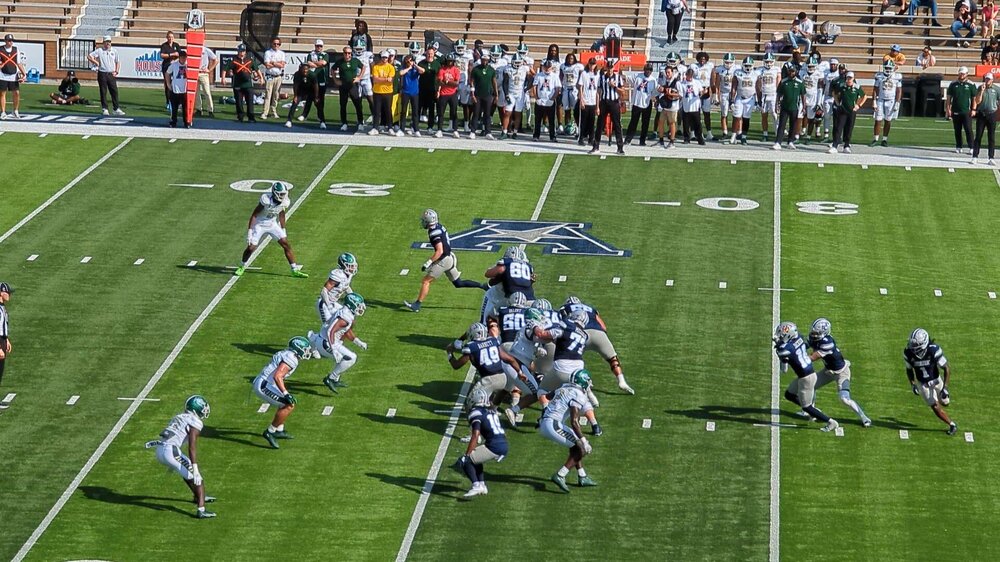
Rice has so far converted three 4th downs, one for a touchdown, in a 7-7 game after 1
-
We're hosting my clients for a video mediation tomorrow, so we're ordering in lunch from the barbecue place down the street. Clients are some burly country boys. In addition to me and them, there's 3 other male lawyers, none of whom are manlets, and a female lawyer who only eats meat. I overheard our clerk ordering just one pound of brisket. Had to do something about that.
Clearly, he hadn't been on Spirit or Frontier
Just in time for bird flu https://www.npr.org/sections/shots-health-news/2025/11/06/nx-s1-5600125/bird-flu-risk-outbreak-trump-administration
i want this but just for cops to wave over people with their high beams on
1234
Can anyone else spot the ancient coastline on this map
Really can't see on a phone screen
United Airlines flight from Houston evacuated at Reagan National Airport after bomb threat | khou.com https://share.google/i7uEmg0Fa77Ic8yTU
 She huffed up like a toronado, but thanks to Gil Bang's bravada, they managed to achieva the results with a minimum of intrigue
Gil bang moved like a rocket 88 as his boss cut the lass
in b4 degenerates
Guac is nature's mayo.
I have never once put masa in chili and when I started seeing in in recipes: If I want body it's oxtails or shanks (and holy fuck are those pricey at heb)
Equine is a type
https://share.google/YOoYbADWNKGAgWF0r They're going to blow up rice stadium aren't they?
She huffed up like a toronado, but thanks to Gil Bang's bravada, they managed to achieva the results with a minimum of intrigue
Gil bang moved like a rocket 88 as his boss cut the lass
in b4 degenerates
Guac is nature's mayo.
I have never once put masa in chili and when I started seeing in in recipes: If I want body it's oxtails or shanks (and holy fuck are those pricey at heb)
Equine is a type
https://share.google/YOoYbADWNKGAgWF0r They're going to blow up rice stadium aren't they?








Football ...
Basketball ...
Baseball ...
Other Sports ...
Futbol ...
🤫995🤫 ...
Gambling ...
Movies & TV ...
Music ...
Hobbies ...
Lulz ...
Food & Travel
...
Daily Texan ...
Business & Markets ...
Cloak Room ...
Help ...
For Sale ...
Board Discussion ...
Advertise...
Tailgate Donations
Account
Search
Configure browser push notifications
Chrome (Android)
- Tap the lock icon next to the address bar.
- Tap Permissions → Notifications.
- Adjust your preference.
Chrome (Desktop)
- Click the padlock icon in the address bar.
- Select Site settings.
- Find Notifications and adjust your preference.
Safari (iOS 16.4+)
- Ensure the site is installed via Add to Home Screen.
- Open Settings App → Notifications.
- Find your app name and adjust your preference.
Safari (macOS)
- Go to Safari → Preferences.
- Click the Websites tab.
- Select Notifications in the sidebar.
- Find this website and adjust your preference.
Edge (Android)
- Tap the lock icon next to the address bar.
- Tap Permissions.
- Find Notifications and adjust your preference.
Edge (Desktop)
- Click the padlock icon in the address bar.
- Click Permissions for this site.
- Find Notifications and adjust your preference.
Firefox (Android)
- Go to Settings → Site permissions.
- Tap Notifications.
- Find this site in the list and adjust your preference.
Firefox (Desktop)
- Open Firefox Settings.
- Search for Notifications.
- Find this site in the list and adjust your preference.