


MissingInAction
Certifiably Surly
-
Joined
Everything posted by MissingInAction
-
 Thats why its so important to call out their bullshit in our personal lives. Embarass them in public, online, every where. They dont understand much except when people point and laugh at them.
 -
Drive Back on prime. Fresh take on the endless driving/walking in a time loop horror trope. I really enjoyed it.
-
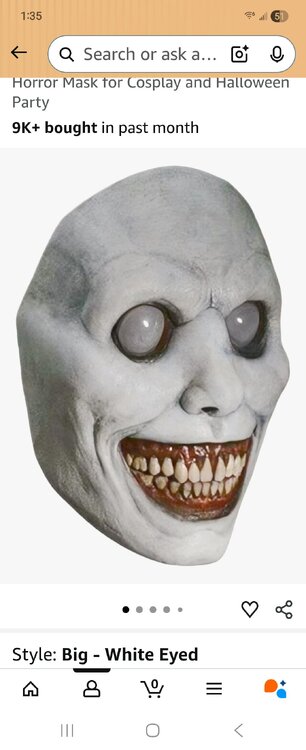
Picked this up for the Halloween party
-
Wow! That got to me, and not much does. No one is safe on this show. So fucking In!
-
So are we having a surly fishing trip to onion creek? I'd love to observe a surly law dog give that cunt the business.
-
The ending had me on lollerskates.
-
Better raise my Onlyfans rates.
-
Cocksuckers spotted at Parmer and tech ridge. Near a school there.
-
Losers like seeing other people lose. If everyone is a loser then no one is! Right?
-
Is this one worth a shit?
-
That link gave my phone space aids.
-
Trick or Treat is pretty good. Great cast and bewbz.
-
I've automated most of my job, but only I know how it works and that's how it will stay. That's why I'm on this god damn board more than any sane person should be.
Nothing like a cool breeze caressing your sack.
And we wonder why there's only 5 women on this entire site.
Forecast for the weekend is looking perfect.
Delete 4fvandyndanvafv4f
What are you rambling about? Texas fucking Fight! All day every day until we die!
Whatever it takes.
Someon on that team has got to be Italian.
Yes. Yes I do. Nibs housing it, defense going no lube, Arch with the best game of his life, Baxter is back, and we are at home against an Italian Commodore. Caldwell may starts and the home crowd better be salty! I have to believe. We have to believe. What's the fucking point otherwise? Let's fucking GO!






Football ...
Basketball ...
Baseball ...
Other Sports ...
Futbol ...
🤫995🤫 ...
Gambling ...
Movies & TV ...
Music ...
Hobbies ...
Lulz ...
Food & Travel
...
Daily Texan ...
Business & Markets ...
Cloak Room ...
Help ...
For Sale ...
Board Discussion ...
Advertise...
Tailgate Donations
Account
Search
Configure browser push notifications
Chrome (Android)
- Tap the lock icon next to the address bar.
- Tap Permissions → Notifications.
- Adjust your preference.
Chrome (Desktop)
- Click the padlock icon in the address bar.
- Select Site settings.
- Find Notifications and adjust your preference.
Safari (iOS 16.4+)
- Ensure the site is installed via Add to Home Screen.
- Open Settings App → Notifications.
- Find your app name and adjust your preference.
Safari (macOS)
- Go to Safari → Preferences.
- Click the Websites tab.
- Select Notifications in the sidebar.
- Find this website and adjust your preference.
Edge (Android)
- Tap the lock icon next to the address bar.
- Tap Permissions.
- Find Notifications and adjust your preference.
Edge (Desktop)
- Click the padlock icon in the address bar.
- Click Permissions for this site.
- Find Notifications and adjust your preference.
Firefox (Android)
- Go to Settings → Site permissions.
- Tap Notifications.
- Find this site in the list and adjust your preference.
Firefox (Desktop)
- Open Firefox Settings.
- Search for Notifications.
- Find this site in the list and adjust your preference.