

Everything posted by Pancho
-
 I don’t think she thinks this at all because she’s as dumb as cat pee
Poor Tennessee…
Not necessarily. NJ has been trending purple for a while. I think Citronella only lost by 3% in 2021
As long as a certain someone on this website doesn’t post here before the night ends, I’m hoping we will be good. I am kinda worried Elmo got involved late #conspiracy
Predictions: VA: Spanberger NJ: Gonna be close but Sherrill holds on NY: Mamdani CA: Prop 50 passes bigly Fat Boy: bleeds from his pussy on truth social because he’s a fat whining little bitch
Same
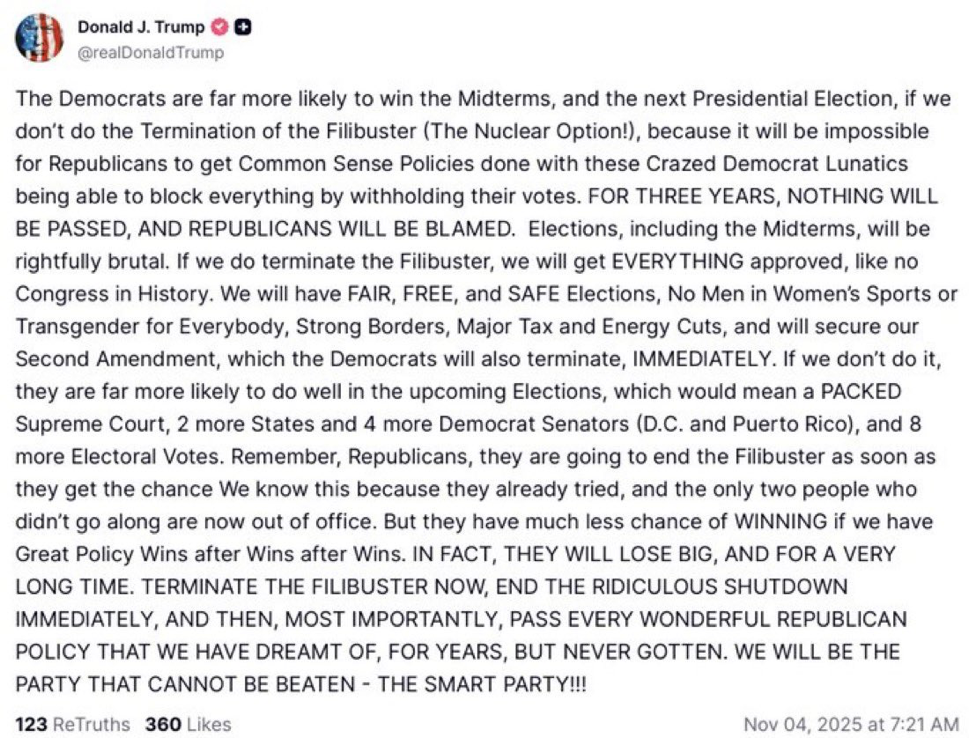
Radical republicans are starting early this Election Day
wtf is he talking about?
What do the fans have to do with anything? They aren’t playing the game.
More like HARD PASS BABY!
I’m still angry we agreed to this game in what is essentially a home game for Duke. I don’t know what Miller was thinking. Oh well, get some experience I gue
Auburn is a true cesspool. The only reason to go there is to get paid, because they will definitely do that for you. Dillingham would be an idiot to leave for Auburn.
Killing all right people?
I don’t know that a loss to Georgia eliminates us, it really depends on what others do and if we beat A&M. Even then, we’re probably on the road somewhere for the 1st round instead of hosting. I’m just hoping for a scenario where somehow A&M drops down and has to travel to play at Tech for the playoffs. I’m not sure why I’m hoping that happens so badly, but A&M is pretty much guaranteed a bye so good for them.
Wait what was personal about this? Is there a storyline with Kentucky that I don’t know about?
Good for these mofos
We are going to win and it’s going to feel like a loss
Outscored 21-0 since the 3rd
They are just slicing and dicing, Jesus Christ
I don’t think she thinks this at all because she’s as dumb as cat pee
Poor Tennessee…
Not necessarily. NJ has been trending purple for a while. I think Citronella only lost by 3% in 2021
As long as a certain someone on this website doesn’t post here before the night ends, I’m hoping we will be good. I am kinda worried Elmo got involved late #conspiracy
Predictions: VA: Spanberger NJ: Gonna be close but Sherrill holds on NY: Mamdani CA: Prop 50 passes bigly Fat Boy: bleeds from his pussy on truth social because he’s a fat whining little bitch
Same
Radical republicans are starting early this Election Day
wtf is he talking about?
What do the fans have to do with anything? They aren’t playing the game.
More like HARD PASS BABY!
I’m still angry we agreed to this game in what is essentially a home game for Duke. I don’t know what Miller was thinking. Oh well, get some experience I gue
Auburn is a true cesspool. The only reason to go there is to get paid, because they will definitely do that for you. Dillingham would be an idiot to leave for Auburn.
Killing all right people?
I don’t know that a loss to Georgia eliminates us, it really depends on what others do and if we beat A&M. Even then, we’re probably on the road somewhere for the 1st round instead of hosting. I’m just hoping for a scenario where somehow A&M drops down and has to travel to play at Tech for the playoffs. I’m not sure why I’m hoping that happens so badly, but A&M is pretty much guaranteed a bye so good for them.
Wait what was personal about this? Is there a storyline with Kentucky that I don’t know about?
Good for these mofos
We are going to win and it’s going to feel like a loss
Outscored 21-0 since the 3rd
They are just slicing and dicing, Jesus Christ







Football ...
Basketball ...
Baseball ...
Other Sports ...
Futbol ...
🤫995🤫 ...
Gambling ...
Movies & TV ...
Music ...
Hobbies ...
Lulz ...
Food & Travel
...
Daily Texan ...
Business & Markets ...
Cloak Room ...
Help ...
For Sale ...
Board Discussion ...
Advertise...
Tailgate Donations
Account
Search
Configure browser push notifications
Chrome (Android)
- Tap the lock icon next to the address bar.
- Tap Permissions → Notifications.
- Adjust your preference.
Chrome (Desktop)
- Click the padlock icon in the address bar.
- Select Site settings.
- Find Notifications and adjust your preference.
Safari (iOS 16.4+)
- Ensure the site is installed via Add to Home Screen.
- Open Settings App → Notifications.
- Find your app name and adjust your preference.
Safari (macOS)
- Go to Safari → Preferences.
- Click the Websites tab.
- Select Notifications in the sidebar.
- Find this website and adjust your preference.
Edge (Android)
- Tap the lock icon next to the address bar.
- Tap Permissions.
- Find Notifications and adjust your preference.
Edge (Desktop)
- Click the padlock icon in the address bar.
- Click Permissions for this site.
- Find Notifications and adjust your preference.
Firefox (Android)
- Go to Settings → Site permissions.
- Tap Notifications.
- Find this site in the list and adjust your preference.
Firefox (Desktop)
- Open Firefox Settings.
- Search for Notifications.
- Find this site in the list and adjust your preference.