

Everything posted by Pancho
-
 I thought they wanted to tone down the rhetoric…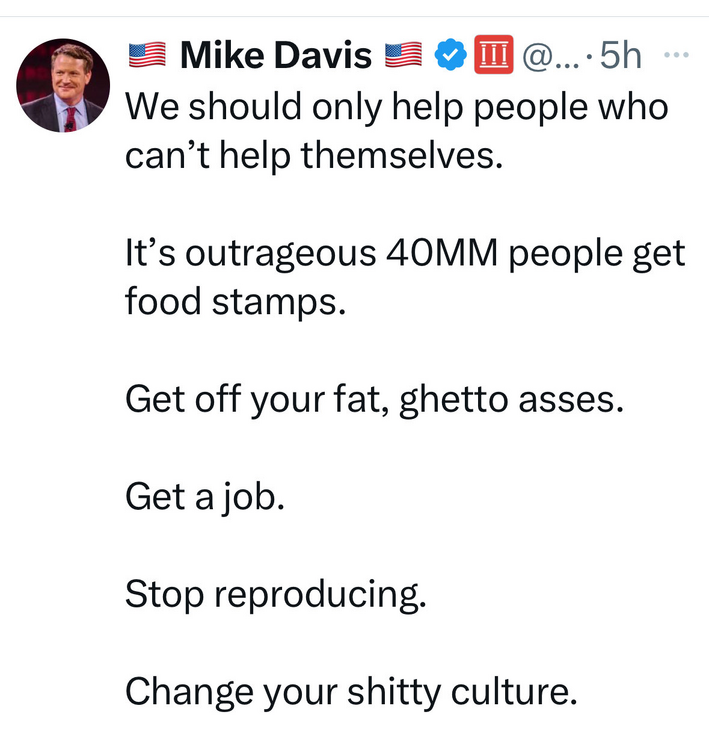
-
Who the fuck are the beach boys?
-
He would have a better chance and more money to do what he needs to do to win at Florida. Mississippi is just as bad financially as LSU, but LSU has more alums so a bigger base.
-
-
I don’t get this photo and I see it often on this website so…
-
our fans after Saturday:
-
Fucking CNN just had a segment “Fat Boy doesn’t rule out running for a 3rd term” Once again, there is no liberal media. It’s all radical right wing propaganda
Kelly and LSU never made sense to me. Then his whole “fam-a-lee” bit just confirmed it.
And then if Sark leaves? Whooo boy!
.
I don’t know what “race bait” is or what it means as that is a term frequently used by radical republicans
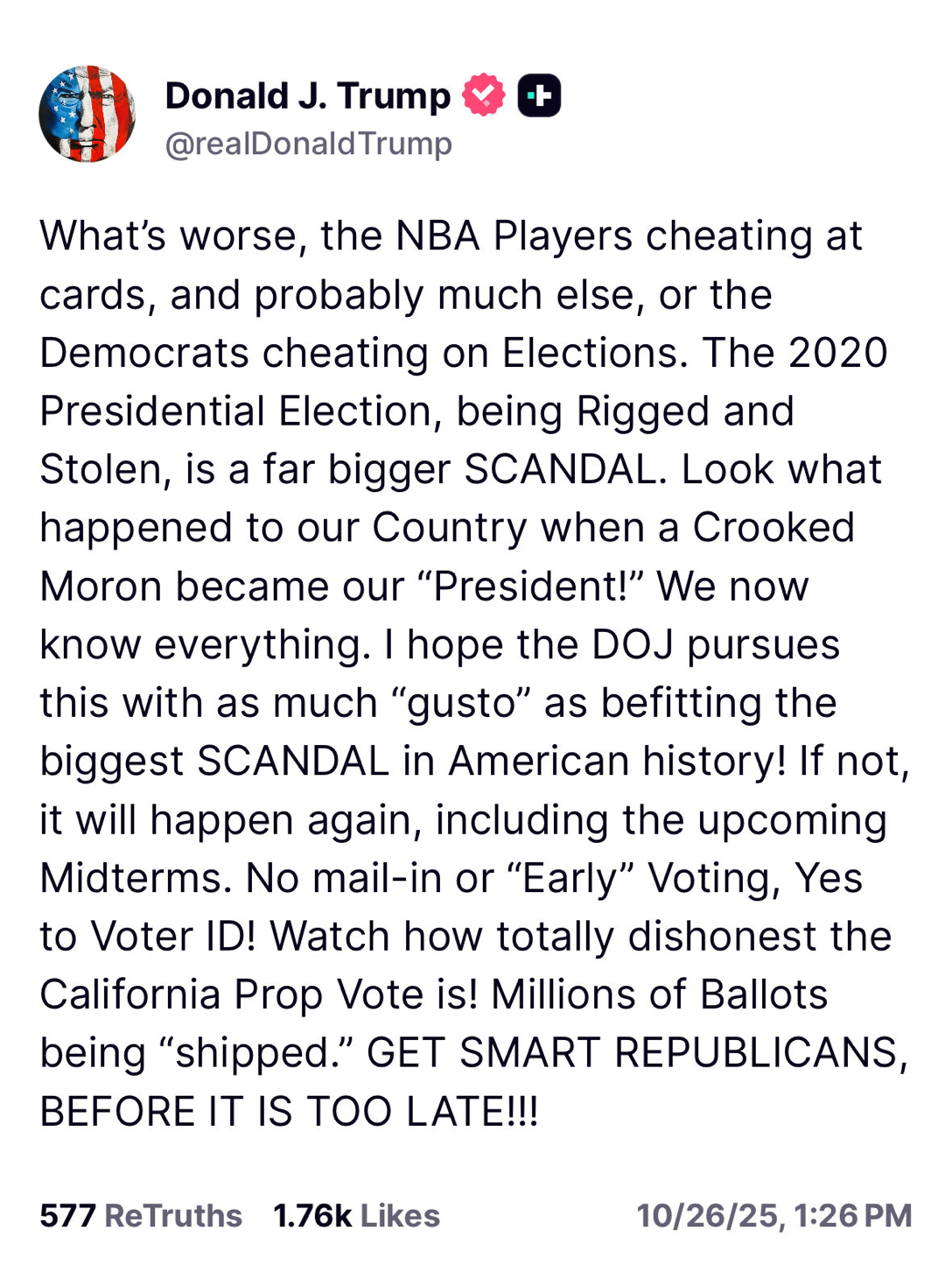
Another radical republican bought by Russia. How will Ana spin this?
 This post sounds like something from texags I don’t know why it hurts and pains some of you to just say that A&M is very, very good, that they are headed for the SECCG, and are headed for the playoffs where they can likely get a first round bye. Instead we get folks here who look at our team needing overtime to beat bottom-dweller Mississippi State and make claims like “we will beat them” when they know deep down A&M is a much better team with better skill position players and a better QB. You’re taking the A&M is little bro and beneath Texas thing so seriously and personally that it’s blinding you looking at this logically. As someone said last night, the A&M game isn’t like the ou game. In the A&M game, the better team wins more often than not. in the ou game, any shit can happen at any time. A&M is the better team, and you need to prepare yourselves that they will run it up at DKR here in a month or so because they will.
You can keep Dabo and his forced team bible studies right there in Souf Carolina, and you will like that you have to keep his bubba gump ass there too
The Missouri team that just lost their QB for the rest of the year?
We barely beat loose booty bottom Mississippi State yet we will somehow find a way to be the #3 team in the country?
Yeah, A&M will be undefeated going into the SECCG
LSU is just a dumbass team, dumber than us I think
Someone make a that Elko face a gif!
This post sounds like something from texags I don’t know why it hurts and pains some of you to just say that A&M is very, very good, that they are headed for the SECCG, and are headed for the playoffs where they can likely get a first round bye. Instead we get folks here who look at our team needing overtime to beat bottom-dweller Mississippi State and make claims like “we will beat them” when they know deep down A&M is a much better team with better skill position players and a better QB. You’re taking the A&M is little bro and beneath Texas thing so seriously and personally that it’s blinding you looking at this logically. As someone said last night, the A&M game isn’t like the ou game. In the A&M game, the better team wins more often than not. in the ou game, any shit can happen at any time. A&M is the better team, and you need to prepare yourselves that they will run it up at DKR here in a month or so because they will.
You can keep Dabo and his forced team bible studies right there in Souf Carolina, and you will like that you have to keep his bubba gump ass there too
The Missouri team that just lost their QB for the rest of the year?
We barely beat loose booty bottom Mississippi State yet we will somehow find a way to be the #3 team in the country?
Yeah, A&M will be undefeated going into the SECCG
LSU is just a dumbass team, dumber than us I think
Someone make a that Elko face a gif!






Football ...
Basketball ...
Baseball ...
Other Sports ...
Futbol ...
🤫995🤫 ...
Gambling ...
Movies & TV ...
Music ...
Hobbies ...
Lulz ...
Food & Travel
...
Daily Texan ...
Business & Markets ...
Cloak Room ...
Help ...
For Sale ...
Board Discussion ...
Advertise...
Tailgate Donations
Account
Search
Configure browser push notifications
Chrome (Android)
- Tap the lock icon next to the address bar.
- Tap Permissions → Notifications.
- Adjust your preference.
Chrome (Desktop)
- Click the padlock icon in the address bar.
- Select Site settings.
- Find Notifications and adjust your preference.
Safari (iOS 16.4+)
- Ensure the site is installed via Add to Home Screen.
- Open Settings App → Notifications.
- Find your app name and adjust your preference.
Safari (macOS)
- Go to Safari → Preferences.
- Click the Websites tab.
- Select Notifications in the sidebar.
- Find this website and adjust your preference.
Edge (Android)
- Tap the lock icon next to the address bar.
- Tap Permissions.
- Find Notifications and adjust your preference.
Edge (Desktop)
- Click the padlock icon in the address bar.
- Click Permissions for this site.
- Find Notifications and adjust your preference.
Firefox (Android)
- Go to Settings → Site permissions.
- Tap Notifications.
- Find this site in the list and adjust your preference.
Firefox (Desktop)
- Open Firefox Settings.
- Search for Notifications.
- Find this site in the list and adjust your preference.