

.gif.e6de8d3f9f63fc8aa6697cb57b052ab8.gif)
Everything posted by Derka
-
.thumb.gif.956081e386d6cdd56735dc7049199019.gif) also anthony taylor was his usual garbage self. top two teams on the table, london derby, sunday night match, huge game, and what does he do? soft yellow two minutes in. “he’s drawn a line in the sand” says the color commentator. yep. two minutes later another booking. and then another. next thing you know they’re announcing that it’s been more than a year since an official booked this many players this quickly. why the fuck would you EVER officiate a big match like this? but wait, there’s more! after establishing that every single minor foul is a booking from the jump, here are the marc cucurella highlights from the game: absolute fucking joke. should be the best league in the world yet it’s ruined by inept-corrupt officiating.
also anthony taylor was his usual garbage self. top two teams on the table, london derby, sunday night match, huge game, and what does he do? soft yellow two minutes in. “he’s drawn a line in the sand” says the color commentator. yep. two minutes later another booking. and then another. next thing you know they’re announcing that it’s been more than a year since an official booked this many players this quickly. why the fuck would you EVER officiate a big match like this? but wait, there’s more! after establishing that every single minor foul is a booking from the jump, here are the marc cucurella highlights from the game: absolute fucking joke. should be the best league in the world yet it’s ruined by inept-corrupt officiating. -
watching the match w my mom yesterday, we desperately want a win and all 3 points vs 10-man chelsea, and as we approach the 90th minute we’re speculating as to how much texts time we’ll have for one last push. we figured 6 or 7 added minutes; it was four; less than the 1h. chelsea got a goal kick ~30 seconds in to the extra time and sloooowwwweeed it down, and with +4 instead of +7 we knew that the match was over. i fucking megaloathe that my two favorite sports have such corrupt and inept officiating.
-
zach edey tonight: 32 pts, 17 reb, 5 blk. zach edey. you used to have to be hakeem to do that. you used to have to be steph to do what peyton pritchard did tonight. shit is wild, yo.
-
that’s my mvp. 🙏🏼
went back to scrolling twitter, and i immediately see this: it’s everywhere, every night.
this post is less about jalen johnson, and more about the fact that it feels like a nightly occurrence to see tweets like this about all sorts of players from all over the league. austin reaves, jalen johnson, kon knueppel, kel’el ware, tyrese maxey, cade cunningham, josh giddey, etc, etc, etc, i could keep going for awhile. does it feel to anyone else like half of the nba is putting up video game numbers every single night? this feels like the steroid era of basketball to me. i don’t recall ever seeing this many players putting up these types of obscene stat lines.
average maga woman: •surgically mutilated face by the age of 25 •iq/personality of miss teen south carolina •morals/soul of cersei lannister •loves morgan wallen seriously, wtf man, i’d rather get with those hairy legged hippies down in austin than these morally corrupt, cosmetically altered, christofascist barbies they keep pumping out in magaland.
this is the system we’re dealing with:
gonna be a long year.
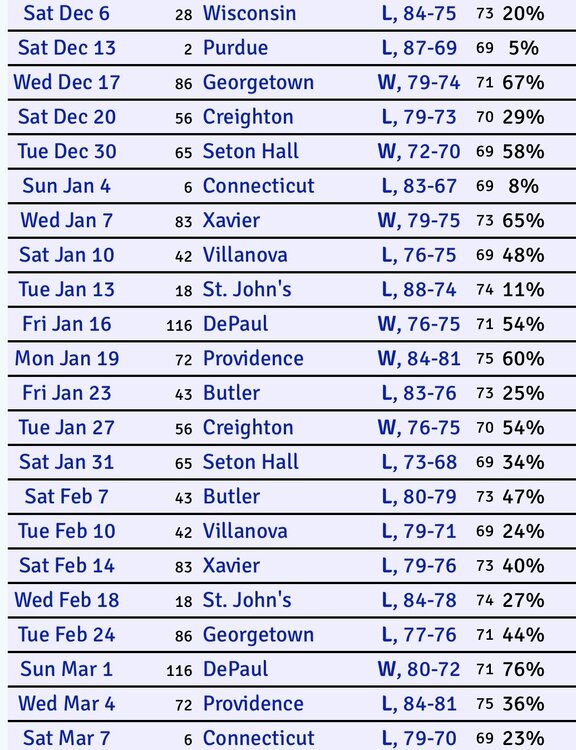 virginia tech for 15 years: •start the season ranked #6 •lose in early september to a dog shit team, fall to #17 •spend the next 10 weeks winning ugly games vs mediocre - shitty teams and passing every team that loses any games under any circumstances along the way •finish back in the top 10 •lose a bcs bowl •rinse/repeat
a&m, ou, and vandy, all of whom recently lost to Texas, are ranked ahead of Texas because they scheduled UTSA, illinois state, and charleston southern, and we scheduled tOSU. that’s it.
all sec wins are worth three big 12 wins, haven’t you heard? in all seriousness we have one bad loss and that came months ago, before this team looked anything like it does today. since that loss we’ve only lost at UGA with wins vs three teams currently ranked ahead of us. the one and only reason we are behind those teams is losing to tOSU back in august. that’s why the Tecas team of today is out- a loss back in August to the best team in america while a&m, ou, and vandy were playing UTSA, illinois state, and charleston southern.
a&m, ou, and vandy all ahead of us, and not one of them would be in the picture at all had they played tOSU week 1 like we did. this is so stupid. anyone pretending like we aren’t being directly punished for scheduling tOSU (and playing them closer than anyone else) is a liar.
tim tebow lost more games in one season than VY did in his career, and that’s not even accounting for urban meyer vs mack brown and how they impact their teams. 2007 florida lost at home to jevan snead and ole miss and still won the MNC while Texas sat at home for the *league* title game because of the TTU loss. we finally join that league and suddenly we get crushed in year one for having a weak schedule and crushed in year two for not winning by enough. weird how that works.
have you already forgotten that one or more of bama, lsu, florida, auburn, georgia etc would do that every year and they’d just say, “that’s sec football baby!!! no easy games!!!”?
beautiful play from saka, trademark finish from merino! COYG!!! 🔴⚪️
oh dang, he actually did get popped. ouch.
virginia tech for 15 years: •start the season ranked #6 •lose in early september to a dog shit team, fall to #17 •spend the next 10 weeks winning ugly games vs mediocre - shitty teams and passing every team that loses any games under any circumstances along the way •finish back in the top 10 •lose a bcs bowl •rinse/repeat
a&m, ou, and vandy, all of whom recently lost to Texas, are ranked ahead of Texas because they scheduled UTSA, illinois state, and charleston southern, and we scheduled tOSU. that’s it.
all sec wins are worth three big 12 wins, haven’t you heard? in all seriousness we have one bad loss and that came months ago, before this team looked anything like it does today. since that loss we’ve only lost at UGA with wins vs three teams currently ranked ahead of us. the one and only reason we are behind those teams is losing to tOSU back in august. that’s why the Tecas team of today is out- a loss back in August to the best team in america while a&m, ou, and vandy were playing UTSA, illinois state, and charleston southern.
a&m, ou, and vandy all ahead of us, and not one of them would be in the picture at all had they played tOSU week 1 like we did. this is so stupid. anyone pretending like we aren’t being directly punished for scheduling tOSU (and playing them closer than anyone else) is a liar.
tim tebow lost more games in one season than VY did in his career, and that’s not even accounting for urban meyer vs mack brown and how they impact their teams. 2007 florida lost at home to jevan snead and ole miss and still won the MNC while Texas sat at home for the *league* title game because of the TTU loss. we finally join that league and suddenly we get crushed in year one for having a weak schedule and crushed in year two for not winning by enough. weird how that works.
have you already forgotten that one or more of bama, lsu, florida, auburn, georgia etc would do that every year and they’d just say, “that’s sec football baby!!! no easy games!!!”?
beautiful play from saka, trademark finish from merino! COYG!!! 🔴⚪️
oh dang, he actually did get popped. ouch.






Football ...
Basketball ...
Baseball ...
Other Sports ...
Futbol ...
🤫995🤫 ...
Gambling ...
Movies & TV ...
Music ...
Hobbies ...
Lulz ...
Food & Travel
...
Daily Texan ...
Business & Markets ...
Cloak Room ...
Help ...
For Sale ...
Board Discussion ...
Advertise...
Tailgate Donations
Account
Search
Configure browser push notifications
Chrome (Android)
- Tap the lock icon next to the address bar.
- Tap Permissions → Notifications.
- Adjust your preference.
Chrome (Desktop)
- Click the padlock icon in the address bar.
- Select Site settings.
- Find Notifications and adjust your preference.
Safari (iOS 16.4+)
- Ensure the site is installed via Add to Home Screen.
- Open Settings App → Notifications.
- Find your app name and adjust your preference.
Safari (macOS)
- Go to Safari → Preferences.
- Click the Websites tab.
- Select Notifications in the sidebar.
- Find this website and adjust your preference.
Edge (Android)
- Tap the lock icon next to the address bar.
- Tap Permissions.
- Find Notifications and adjust your preference.
Edge (Desktop)
- Click the padlock icon in the address bar.
- Click Permissions for this site.
- Find Notifications and adjust your preference.
Firefox (Android)
- Go to Settings → Site permissions.
- Tap Notifications.
- Find this site in the list and adjust your preference.
Firefox (Desktop)
- Open Firefox Settings.
- Search for Notifications.
- Find this site in the list and adjust your preference.