.gif.e6de8d3f9f63fc8aa6697cb57b052ab8.gif)
Everything posted by Derka
-
.thumb.gif.956081e386d6cdd56735dc7049199019.gif) odd. @immamac any idea why the tweet is showing up for some but not for others?
can someone take this photo and photoshop jd vance’s fat grinning curly headed face onto it please?
odd. @immamac any idea why the tweet is showing up for some but not for others?
can someone take this photo and photoshop jd vance’s fat grinning curly headed face onto it please?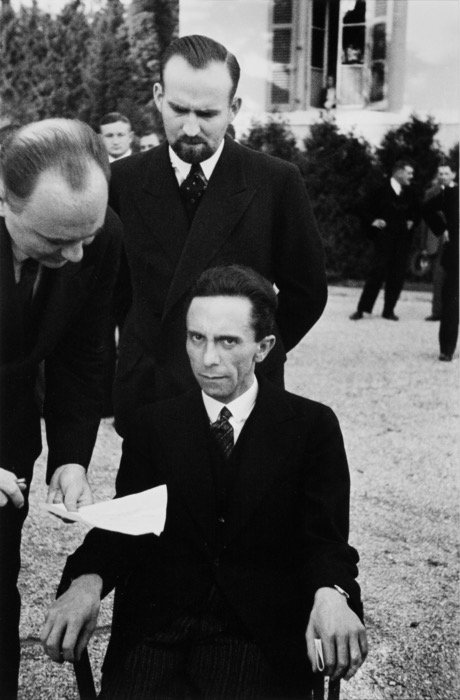 apparently not. is this how my post looks to everyone else?
 nothing to see here. https://x.com/tsengputterman/status/2009084996578103483?s=46
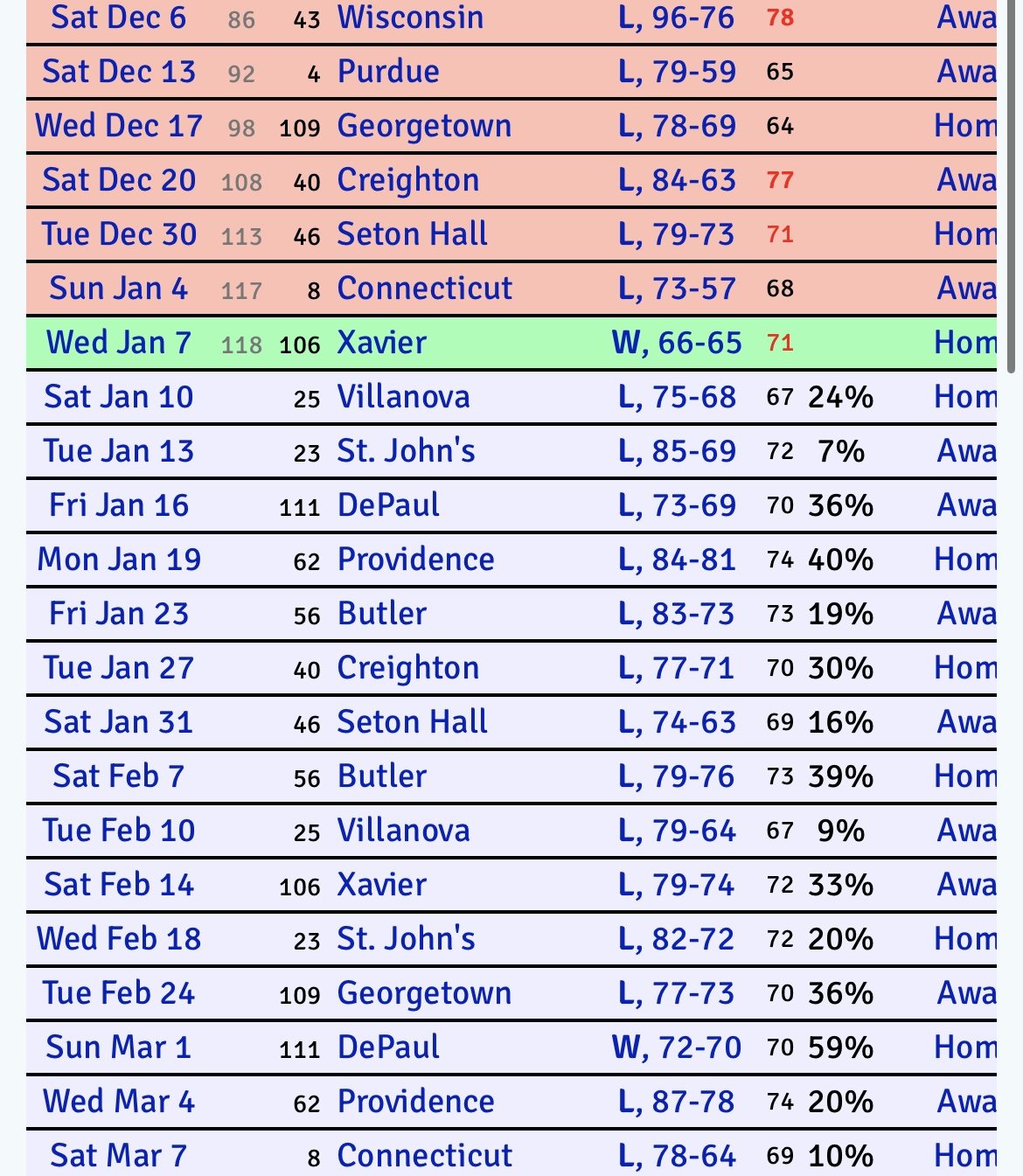
big win for dirty shaka and the boys last night. not a lot of guaranteed w’s left on their schedule.
nothing to see here. https://x.com/tsengputterman/status/2009084996578103483?s=46
big win for dirty shaka and the boys last night. not a lot of guaranteed w’s left on their schedule.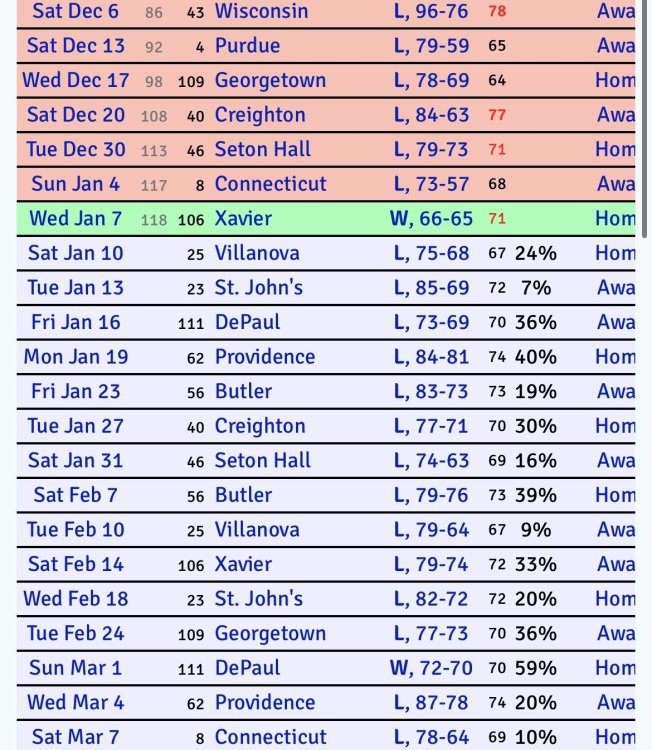 i don’t understand what washington gets out of this.
uconn came back and won 103-98.
she was parked, yielding to the ICE agents and waving them by her, when this nazi criminal came after her out of nowhere and demanded that she, “get the fuck out of the car.” fearing for her life she slowly reversed, and then attempted to flee, surely terrified and confused beyond belief. three seconds later she was dead. this is america. this is what trump wants. this is literally their plan. i am so fucking disillusioned, and we are so fucked.
wescott eberts makes bitterwhiteguy look like dr.jack ramsay.
anyone who went to a big monday game vs ou or kansas, or a cbs noon game vs ucla or villanova knows this. the FEC would be buzzing beforehand, and rocking throughout. ~17,000 people in attendance and plenty more who wanted to get in but couldn’t. people are just beaten down from the interminable roller coaster of Texas Baskerball, starting with the lows of the latter part of rick’s time here, to the high of shaka’s first year, to the many lows of his tenure, to the high of chris beard and his immediate success/revival of the program, to the low of his DV arrest/firing, to the spinning-our-wheels tenure of RT, to the new low of total and complete apathy at the hiring and performance of sean miller. we’re all here and ready to go, but we’ve been beaten down something fierce, and it’s going to take something that resembles the short lived beard era to get us back. we want to be all-in again, but this ain’t it.
i’ve seen a screenshot where the ball is still on his fingertips and the red light is on, but yeah, he was honestly late by 0.1, if that.
Texas wins by kenpom rank: 33 NC State 257 Southern 302 Le Moyne 315 Lafayette 329 Kansas City 335 Maryland Eastern Shore 350 Rider 352 Fairleigh Dickinson NR Chaminade
Football ... Basketball ... Baseball ... Other Sports ... Futbol ... 🤫995🤫 ... Gambling ... Movies & TV ... Music ... Hobbies ... Lulz ... Food & Travel ... Daily Texan ... Business & Markets ... Cloak Room ... Help ... For Sale ... Board Discussion ... Advertise... Tailgate Donations
i don’t understand what washington gets out of this.
uconn came back and won 103-98.
she was parked, yielding to the ICE agents and waving them by her, when this nazi criminal came after her out of nowhere and demanded that she, “get the fuck out of the car.” fearing for her life she slowly reversed, and then attempted to flee, surely terrified and confused beyond belief. three seconds later she was dead. this is america. this is what trump wants. this is literally their plan. i am so fucking disillusioned, and we are so fucked.
wescott eberts makes bitterwhiteguy look like dr.jack ramsay.
anyone who went to a big monday game vs ou or kansas, or a cbs noon game vs ucla or villanova knows this. the FEC would be buzzing beforehand, and rocking throughout. ~17,000 people in attendance and plenty more who wanted to get in but couldn’t. people are just beaten down from the interminable roller coaster of Texas Baskerball, starting with the lows of the latter part of rick’s time here, to the high of shaka’s first year, to the many lows of his tenure, to the high of chris beard and his immediate success/revival of the program, to the low of his DV arrest/firing, to the spinning-our-wheels tenure of RT, to the new low of total and complete apathy at the hiring and performance of sean miller. we’re all here and ready to go, but we’ve been beaten down something fierce, and it’s going to take something that resembles the short lived beard era to get us back. we want to be all-in again, but this ain’t it.
i’ve seen a screenshot where the ball is still on his fingertips and the red light is on, but yeah, he was honestly late by 0.1, if that.
Texas wins by kenpom rank: 33 NC State 257 Southern 302 Le Moyne 315 Lafayette 329 Kansas City 335 Maryland Eastern Shore 350 Rider 352 Fairleigh Dickinson NR Chaminade
Football ... Basketball ... Baseball ... Other Sports ... Futbol ... 🤫995🤫 ... Gambling ... Movies & TV ... Music ... Hobbies ... Lulz ... Food & Travel ... Daily Texan ... Business & Markets ... Cloak Room ... Help ... For Sale ... Board Discussion ... Advertise... Tailgate DonationsAccount
Search
Configure browser push notifications
Chrome (Android)
- Tap the lock icon next to the address bar.
- Tap Permissions → Notifications.
- Adjust your preference.
Chrome (Desktop)
- Click the padlock icon in the address bar.
- Select Site settings.
- Find Notifications and adjust your preference.
Safari (iOS 16.4+)
- Ensure the site is installed via Add to Home Screen.
- Open Settings App → Notifications.
- Find your app name and adjust your preference.
Safari (macOS)
- Go to Safari → Preferences.
- Click the Websites tab.
- Select Notifications in the sidebar.
- Find this website and adjust your preference.
Edge (Android)
- Tap the lock icon next to the address bar.
- Tap Permissions.
- Find Notifications and adjust your preference.
Edge (Desktop)
- Click the padlock icon in the address bar.
- Click Permissions for this site.
- Find Notifications and adjust your preference.
Firefox (Android)
- Go to Settings → Site permissions.
- Tap Notifications.
- Find this site in the list and adjust your preference.
Firefox (Desktop)
- Open Firefox Settings.
- Search for Notifications.
- Find this site in the list and adjust your preference.